Having Netflix on huawei is not as difficult as you have perceived it to be. Getting Netflix is actually pretty easy nowadays. Netflix is one of the most downloaded streaming services in the world today, and true enough, Huawei users also cannot get enough of this app to watch all of their favorite movies, documentaries, and television shows. This is because of the wide array of choices that people can binge-watch on the site. Netflix on Huawei translates to uninterrupted viewing and amazing fun. With that said, here are simple ways to get Netflix working on your Huawei device.
How to View Netflix on Huawei Devices
Through AppGallery
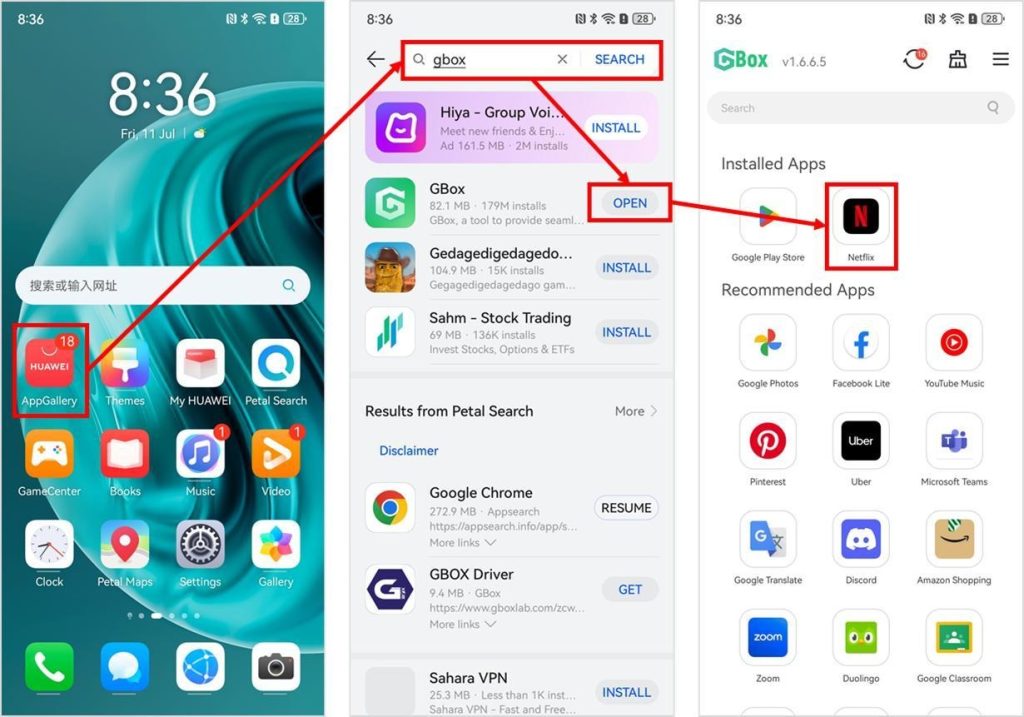
The easiest way to get Netflix on huawei devices is to install GBox and AppGallery. GBox offers an environment for various apps that usually do not run directly on Huawei devices, and gives functionality to these apps so that they will work on them. AppGallery, on the other hand, is a primary marketplace for all Huawei apps available to consumers, and here is where you will see the installer of Netflix. To do this step, you must download both the Netflix app and the GBox platform so that they can work together and display movies and videos on your Huawei device. After you have installed both apps on your phone or tablet, you can go to GBox and test the Netflix app. You can try out some of your favorite videos by opening them on the Netflix app inside GBox.
Through Petal Search
Another simple way to get Netflix on your Huawei device is through Petal Search. In case you are unfamiliar with it, all of Huawei’s devices have Petal Search because this is the search engine that the company developed. You can utilize Petal Search to look for a Netflix APK that comes from a reliable source. You should keep in mind to always double and triple-check your downloaded file to avoid any kind of virus or corrupted data infiltrating your phone or tablet. After downloading the APK, you can open the file and store Netflix on your Huawei device. Again, you have to be careful with your APK download in order to prevent anything from affecting the functionality of your Huawei device.
Common bugs and solutions
Netflix can encounter various crashes, and you will also experience bugs and errors with it, so you just have to keep calm and do not panic when these things occur. If you find yourself in front of your device and not being able to open videos and movies, you should restart the app and your mobile device. If this still does not work, you may have to delete other apps that are affecting Netflix negatively. Insufficient memory may prevent you from saving movies offline. Not being able to log in may be caused by a low internet connection signal, so you need to move to a place of better reception so that you can log in to Netflix successfully.
Conclusion
Netflix on huawei provides loyal consumers with a way to have access to hundreds of television shows, movies, and reality TV. These kinds of entertainment can be experienced by Huawei users because of the ability of their devices to download Netflix in two ways. You can either choose to download using AppGallery or get an APK by using Petal Search. They can both be accomplished in a matter of minutes.