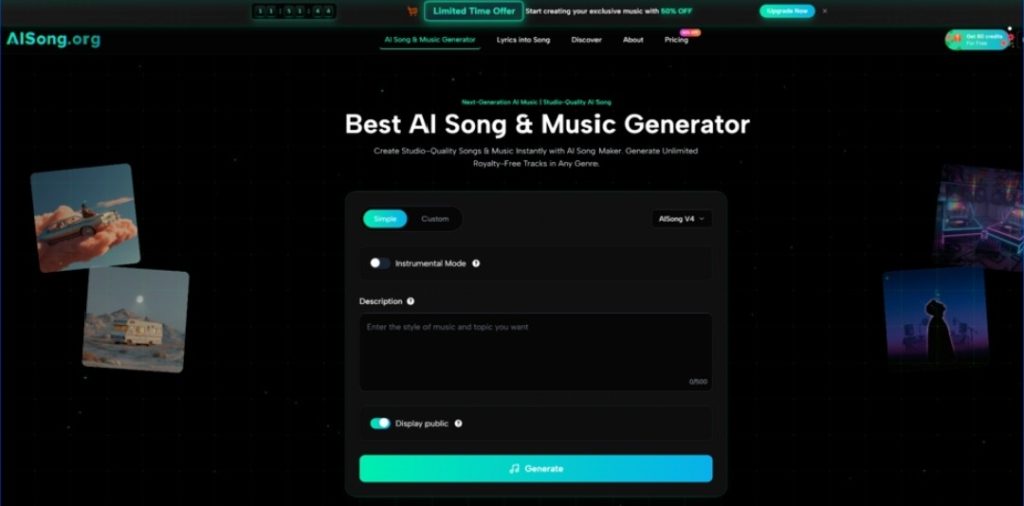
Most people don’t start a project thinking, “I need an original song.” They start with a simpler, more urgent need: “I need audio that makes this feel finished.” If you create videos, podcasts, ads, or game prototypes, music is often the last missing layer—and also the most time-consuming to get “just right.” In that context, I approached AI Music Generator tools like AISong the same way I’d approach any production shortcut: not as a promise of effortless perfection, but as a way to reduce the time it takes to reach a workable, publishable result.
What surprised me most wasn’t that AISong could generate tracks. It was how quickly it helped me *decide*—because it turned a fuzzy creative request into multiple testable options.
Why “Music Selection” Is Harder Than People Admit
Music is subjective, but “fit” is measurable when you look at how audio supports a piece of content. In real workflows, the friction usually comes from:
- You can’t tell whether a track fits until you place it under footage or voice.
- Library browsing creates decision fatigue; everything is “almost right.”
- Custom production can be excellent, but it’s rarely fast.
- When you’re late in the editing timeline, you compromise.
AISong is useful when it reduces this friction by making the audition process faster: you generate options, test them in your timeline, then iterate with clearer direction.
A Different Lens: AISong as a “Brief Translator,” Not a Composer Replacement
Instead of asking, “Can it write good music?” I used a more practical question:
Can it translate my brief into audio drafts quickly enough that I can run a real fit test?
That’s where an AI song generator earns its place. AISong is structured around a simple input-output loop—describe → generate → preview → export—and it includes two modes that affect how much control you want over the process.
The Two Modes Map to Two Stages of Real Creative Work
Simple Mode: Exploration When You Don’t Want to Overthink
Simple Mode works best when you need direction fast. You provide the vibe, genre, and a few anchors, then listen for what “clicks.” In my workflow, this felt like the early ideation stage—finding a groove, an atmosphere, or a chord feel worth keeping.
What Simple Mode is good for
- Exploring multiple interpretations of the same mood
- Generating options for A/B testing under the same footage
- Building a shortlist quickly
Custom Mode: Convergence When You Want Fewer Surprises
Custom Mode is the stage where you already know what you want and you’re trying to converge. If you have lyrics, narrative requirements, or a strong brand tone, the additional control is the point. It felt closer to directing than brainstorming.
What Custom Mode is good for
- Adding lyrical intent instead of letting the tool guess
- Tightening genre boundaries
- Making iterations that are incremental and deliberate
Instrumental Focus: Often the Highest “Usability per Minute”
If your content is voice-led, instrumental generation can be the most reliably usable output. It avoids the biggest variability point (vocals) and tends to integrate more cleanly under narration.
The “Fit Test” Method: How I’d Recommend Using AISong
If you want to evaluate AISong like a professional tool instead of a novelty, run a fit test. Here’s a method that avoids both hype and cynicism.
Step 1: Define the job the music must do
Pick one of these, explicitly:
- Hook attention in 3–5 seconds
- Sustain background energy under narration
- Create tension and resolve
- Loop smoothly without fatigue
Step 2: Write a prompt like a production brief
Use a structure that keeps your intent clear:
- Mood: warm / tense / hopeful / dreamy
- Genre: lo-fi / indie pop / cinematic ambient / electronic
- Texture: piano motif / soft pads / tight drums / airy guitar
- Constraint (optional): short intro / loop-friendly / minimal vocals
When I used “brief style” prompts rather than metaphor-heavy prompts, results were easier to judge and refine.
Step 3: Generate in batches, not singles
Plan for 3–5 generations as a normal baseline. The batch approach makes selection faster because you’re comparing candidates instead of judging in isolation.
Step 4: Test under real content immediately
This is the key. A track can sound great alone and fail under footage. Drop it into your edit, then assess:
- Does it compete with the voice?
- Does it match pacing?
- Does it create unwanted emotional signals?
Step 5: Iterate with one change at a time
Instead of rewriting your entire prompt, adjust a single variable:
- “less reverb”
- “simpler drums”
- “more space”
- “stronger bass”
- “earlier energy lift”
This keeps iterations directional rather than chaotic.
Comparison Table: AISong’s Role in a Practical Toolkit
| Use-Case Question | AI Song Maker | Stock Music Libraries | DIY DAW Production | Hiring a Composer |
| “I need usable audio today” | Strong (fast drafts + variations) | Medium (search can take time) | Weak unless you’re fast/experienced | Weak (turnaround time) |
| “I need something that matches my brief” | Medium-strong (prompt iterations) | Medium (limited to what exists) | Strong (full control) | Strong (human interpretation) |
| “I hate browsing libraries” | Strong (generate instead of scroll) | Weak (browsing is the workflow) | Neutral | Neutral |
| “I need a tight loop for background use” | Strong if prompted well | Medium (some tracks loop well) | Strong | Strong |
| “I need deterministic precision” | Weak-medium (variance exists) | Strong (fixed track) | Strong | Strong |
This framing keeps the choice honest. AISong is most valuable when speed, iteration, and “fit testing” matter more than absolute control.
Limitations That Make the Experience More Real
Prompt sensitivity is real
Small wording changes can cause noticeable differences. Expect a short learning curve.
Multiple attempts are normal
In my testing mindset, regeneration isn’t failure—it’s sampling. The best output is often version 3 or 4.
Vocals can fluctuate
If your project depends on clear, natural vocals, budget additional iterations and be ready to pivot to instrumental.
The broader ecosystem is evolving
AI-generated media is a fast-moving space, including licensing and policy discussions. If you use AI music commercially, it’s reasonable to keep basic records of the settings and plan used at the time you generated a track, and to stay informed about industry guidance.
Who Should Use AISong (and Who Shouldn’t)
AISong fits best if
- You create frequently and need audio that matches content quickly.
- You want options you can test under real footage.
- You value an efficient “brief → draft → refine” loop.
AISong may not fit if
- You need precise control over every production decision.
- You require enterprise-grade provenance and audit trails.
- You prefer fully offline workflows.
A practical closing thought
If you treat AI Song as an AI song generator that helps you run a fast “music fit test,” it becomes easier to judge fairly. The question isn’t whether every output is perfect. The question is whether it reliably shortens the path from a clear creative brief to a track you can actually use.



